Map
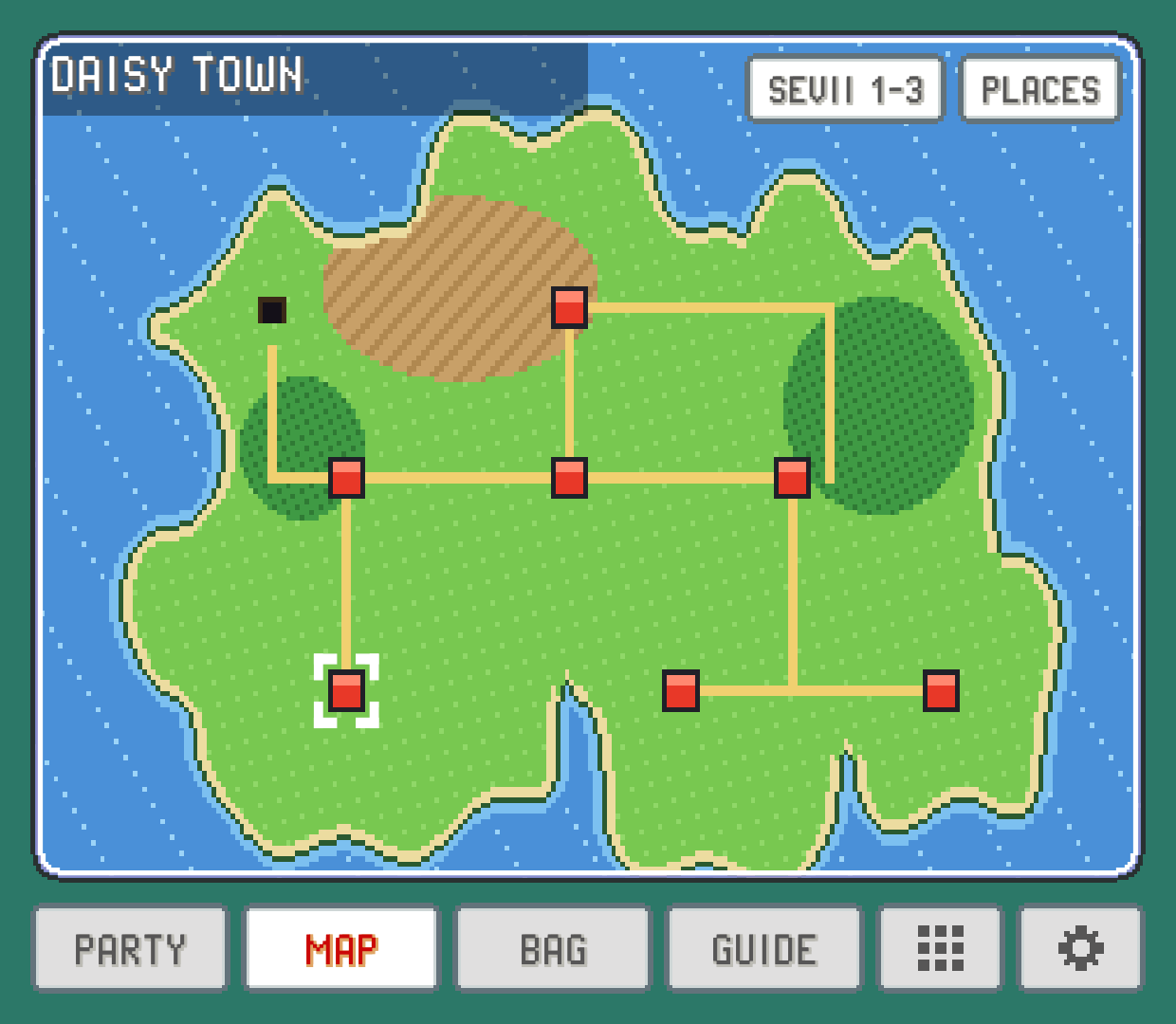
The game's own region map with you on it, tapping a spot to name it, and finding any town or route from the PLACES list.
The MAP tab is the game's town map, always open. It answers "where am I?" at a glance and "where is that town the guide mentioned?" in two taps, without digging the map out of your bag.
You on the map
The map is drawn the way your game draws it: the region's own picture, your character's head on the tile where the game would put it, and the game's blinking cursor around the place you're in. The place's name sits in the game's own label: a dark strip in the top left in FireRed and its relatives, a framed window in the bottom right in Emerald and its relatives. In FireRed-style games a second strip names a cave or other place on that spot when there is one.
Indoors and underground, the head stays on the last outdoor spot you were on, like the game does.
The cursor pulses between two sizes like the game's. To keep it still, turn off MAP CURSOR BLINK in SETTINGS > TWEAKS.
Tap a spot to name it
Tap anywhere on the map to move the cursor there and see what it is. The label shows the place's name and the cursor frames all of it, so tapping one end of a long route highlights the whole route. Tapping the sea or empty land shows no name.
When the cursor isn't on you, a ME button appears. Tap it, or tap your character's head, to put the cursor back on where you are.
PLACES: find any town or route
Tap PLACES for a list of every place on the game's maps:
YOUR LOCATIONat the top takes you back to yourself.TOWNS & CITIES, in the order the game lists them.ROUTES, by number.OTHER PLACES(caves, forests, towers and the like), A to Z.
Pick one and the map shows it with the cursor on it. This is the quickest way to answer "where is that?" when the Guide or an in-game character mentions somewhere you haven't been.
More than one map
Some games have more than one map. In FireRed and LeafGreen, for example, the Sevii Islands are on maps of their own. Those games get a region button next to PLACES, named after the next map (SEVII 1-3, SEVII 4-5, SEVII 6-7, back to KANTO); Gold's, Silver's, Crystal's and Crystal Clear's are JOHTO and KANTO; Prism has six, NALJO, RIJON, JOHTO, KANTO, SEVII and TUNOD; Polished Crystal has JOHTO, KANTO and ISLANDS (the Orange Islands); in other games the maps are numbered. Tap it to flip through them. When you're on another map than the one shown, ME brings you home.
In Crystal Clear you design your own character, and in Prism you pick one of six, so the map doesn't draw you: the cursor and the place name still show where you are. Polished Crystal draws you in the look you picked at the start, as its own map does.
In the PLACES list, places that aren't on the first map say which map they're on.
Flying to a town
When someone in your party knows the move that carries you between towns, a blue button for it appears under PLACES. Tap it for the towns you can fly to right now, pick one, and the game takes you there with its own animation, just as if you'd used the move from the party menu.
The game's own rules still apply: you need the badge that allows it and you have to be outdoors, walking around, with no menu or conversation open. If something's missing, the button tells you what instead of flying.
It works in FireRed, LeafGreen, Emerald, Ruby and Sapphire in every language and on these hacks: Unbound, Radical Red, Ultra Violet, Ghost Grey, Gaia, Odyssey, Amethyst, Sword and Shield Ultimate Plus, Orange Islands, Glazed (its first region), Emerald Legacy, Heart and Soul, SoulGold, Lazarus and Emerald Imperium.
On the Game Boy it works in Red, Blue, Yellow (in every language) and Crystal. The list is the one the game's own map would give you: in Red, Blue and Yellow every town you've been to, and in Crystal the towns you've been to in the region you're in (Kanto's once you've reached the Indigo Plateau).
Which games get a picture
No game art comes with PokeDaisy. The map picture is rebuilt from your own ROM, once, the first time you play a game, and kept after that. So the very first time, the map can take a moment to appear.
FireRed, LeafGreen, Emerald, Ruby and Sapphire use their region's own map.
Many hacks have their own region drawn into the ROM, and get it: Unbound, Radical Red, Gaia, Odyssey and other FireRed-based hacks, plus hacks like Lazarus, SoulGold, Heart and Soul, Glazed and Quetzal. Quetzal Alpha 0.8.4 (and Moemon Quetzal) is Hoenn only and shows the Hoenn map.
Hacks that kept the original map use FireRed's or Emerald's.
When there's no picture for a game (or for the area you're in), the tab shows the place's name and your position as text instead.
Something wrong or missing here? Edit this page on GitHub or tell us.