Battles
The BATTLE tab's touch buttons, move verdicts, the INFO and SUGGESTIONS pages, the foe's team and switching Pokémon.
In a battle the companion becomes your battle screen: big touch buttons for your turn, and the answers to the questions you'd otherwise look up mid-fight. Will this move hit hard? What is the foe weak to? Who should I send in?
The BATTLE tab
When a battle starts, a BATTLE tab appears at the front of the tab bar and opens by itself. When the battle ends, you're back on the tab you were using. To keep the companion where it is instead, turn off JUMP TO BATTLE in SETTINGS > TWEAKS; the BATTLE tab still shows up for you to tap.
The tab only appears when PokeDaisy can read the battle. In a game where it can't, you stay on your usual tabs rather than looking at an empty page.
Touch buttons on your turn
On your turn the tab shows buttons laid out like the later handheld games: a big FIGHT, with BAG, RUN and POKéMON underneath. Above them, a row of balls shows your party's health (grey for a fainted Pokémon) and, in a trainer battle, the trainer's on the right. Between turns, while attacks play out, the tab shows INFO instead.
These buttons press the game's buttons for you: tap FIGHT and then a move, and the game picks that move. While the game catches up, a small rocking ball shows over the buttons and your own controls pause for a moment so the two don't fight each other.
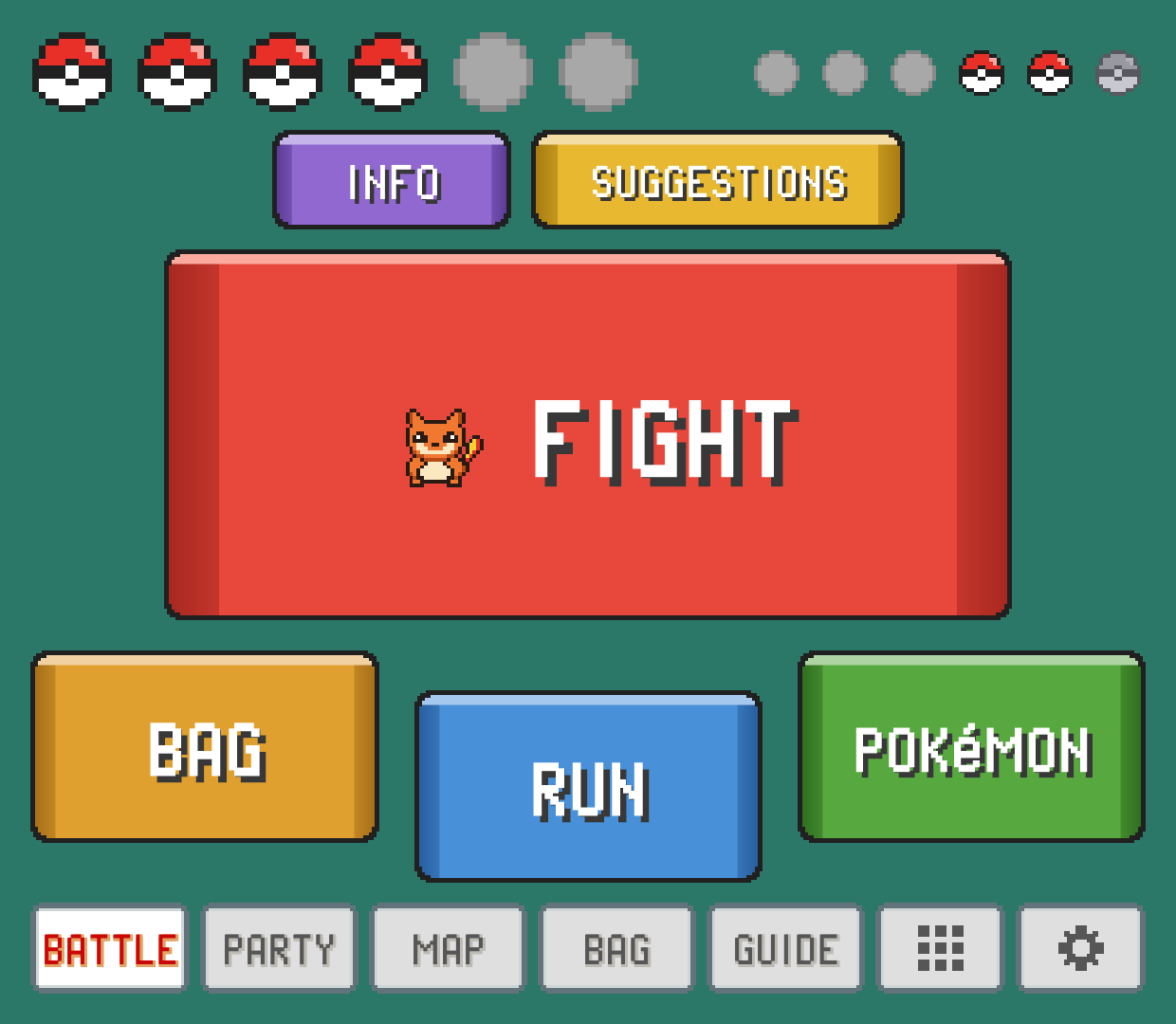
What each button does:
FIGHTopens your four moves right away. Tap one to use it, orCANCELto go back.BAGopens the game's own bag on the top screen. Pick your item there;BACKon the companion backs out of it.POKéMONopens your party on the companion to switch (see Switching during a battle).RUNruns away, and clears the "got away" message for you too.
Elite Redux has no bag in its battle menu, so there the tab shows RUN and POKéMON side by side under FIGHT, with no BAG.
Moves and their verdicts
Each move card shows its name, type, power (PWR) and PP left, plus a verdict against the foe in plain words:
| Verdict | Meaning |
|---|---|
SUPER 2x | Super effective (4x when both of the foe's types are weak to it). |
NEUTRAL 1x | Normal damage. |
RESISTED ½x | Not very effective. |
IMMUNE 0x | It won't affect the foe at all. |
STATUS | A move that doesn't deal damage. |
NO PP | Out of uses. You can't pick it. |
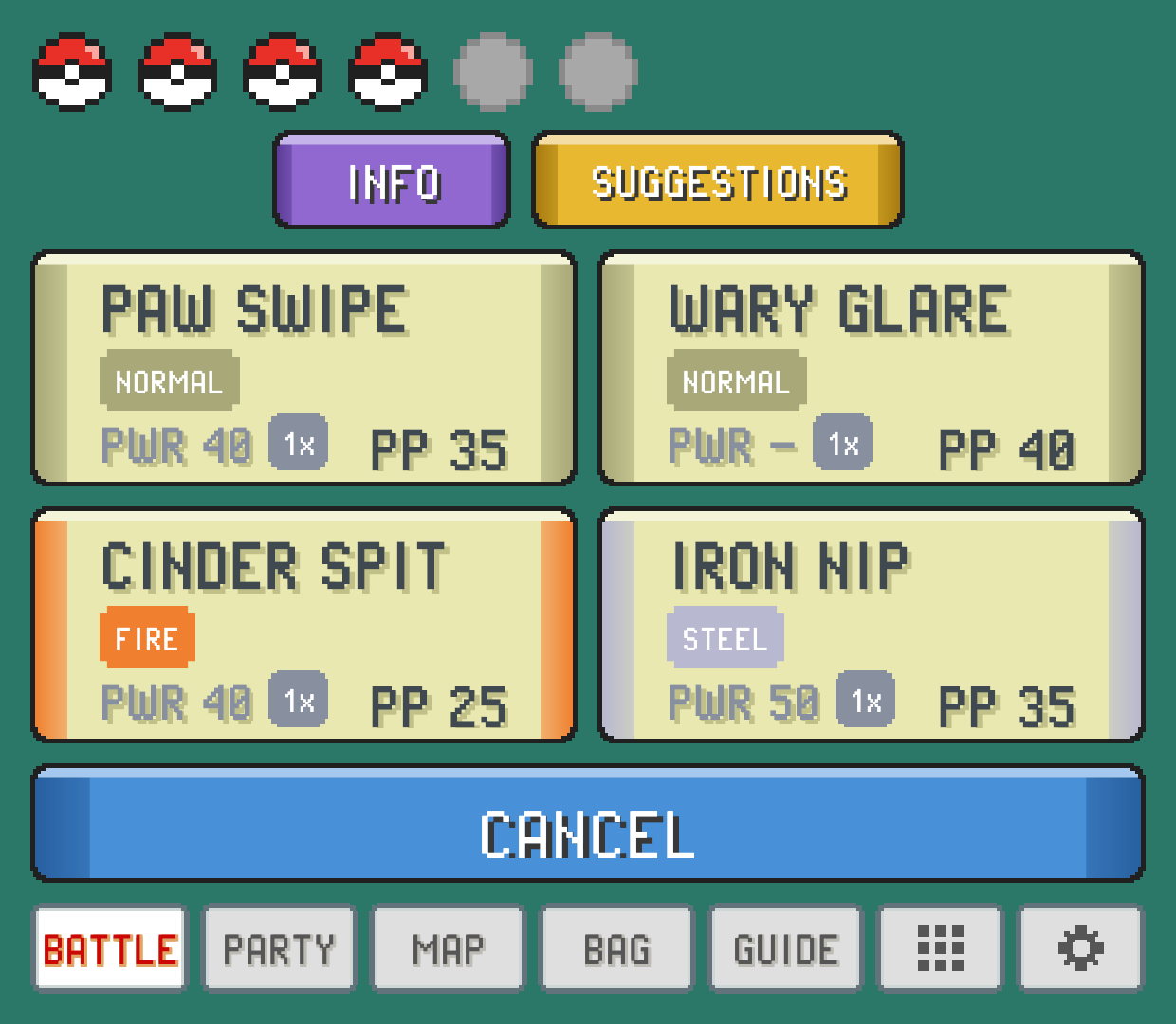
ONE-TAP MOVES
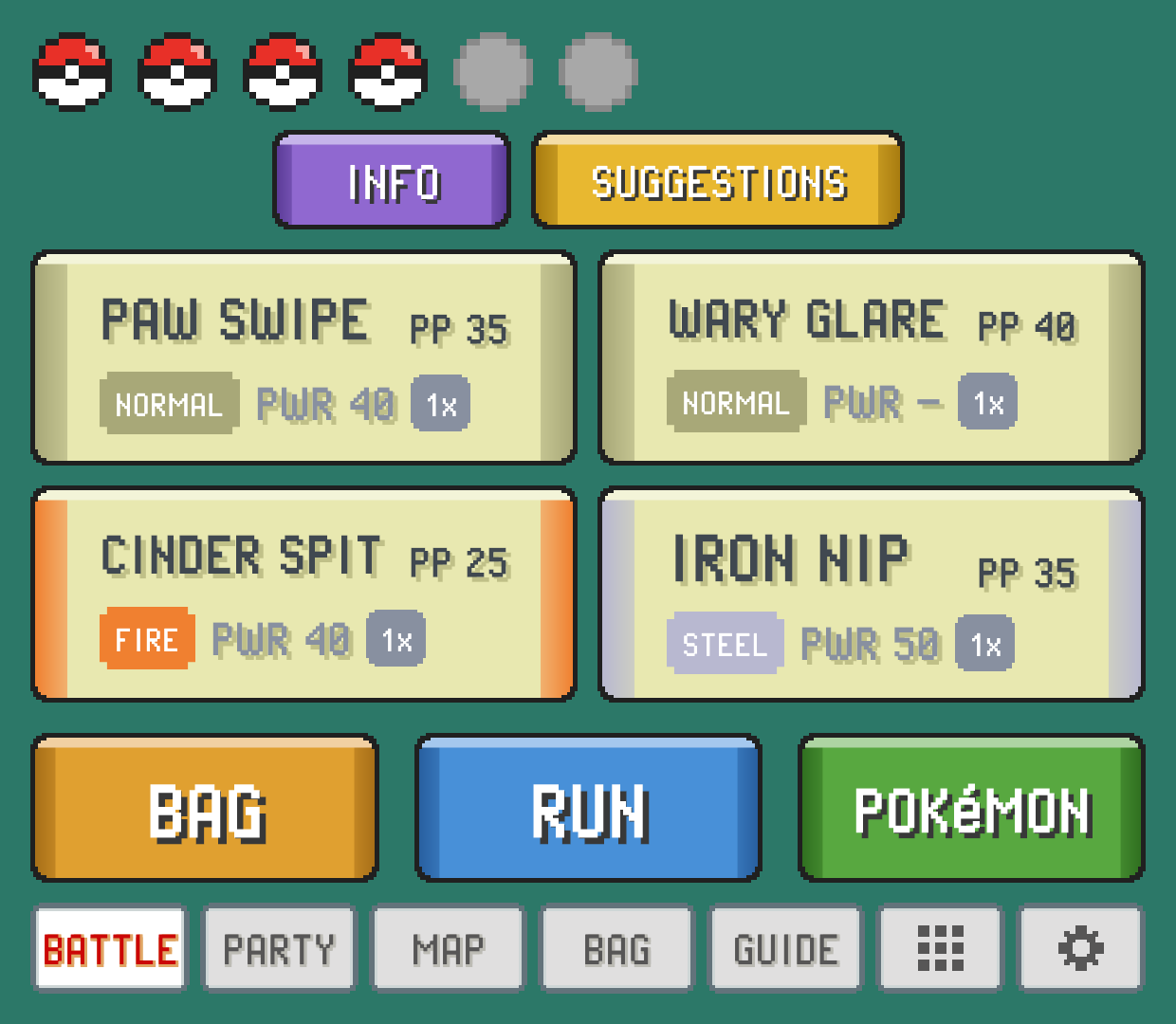
If you want to skip the FIGHT step, turn on ONE-TAP MOVES in SETTINGS (COMPANION group). Your four moves then sit right on your turn's screen, where FIGHT was, with BAG, RUN and POKéMON in a row underneath. One tap picks FIGHT and the move together.
INFO: the whole matchup on one page
Tap INFO for the battle at a glance. It's split down the middle, you on the left and the foe on the right:
Top: a card for each Pokémon in battle with its icon, name, level, status, types and HP. Your card also warns you when the foe's type hits you hard (for example
ROCK 2x), or saysRESISTSwhen you shrug off its types.Bottom left: your moves, each with its verdict against the foe.
Bottom right: what the foe is
WEAK TO, what itRESISTSand what it'sIMMUNE TO, strongest weakness first.
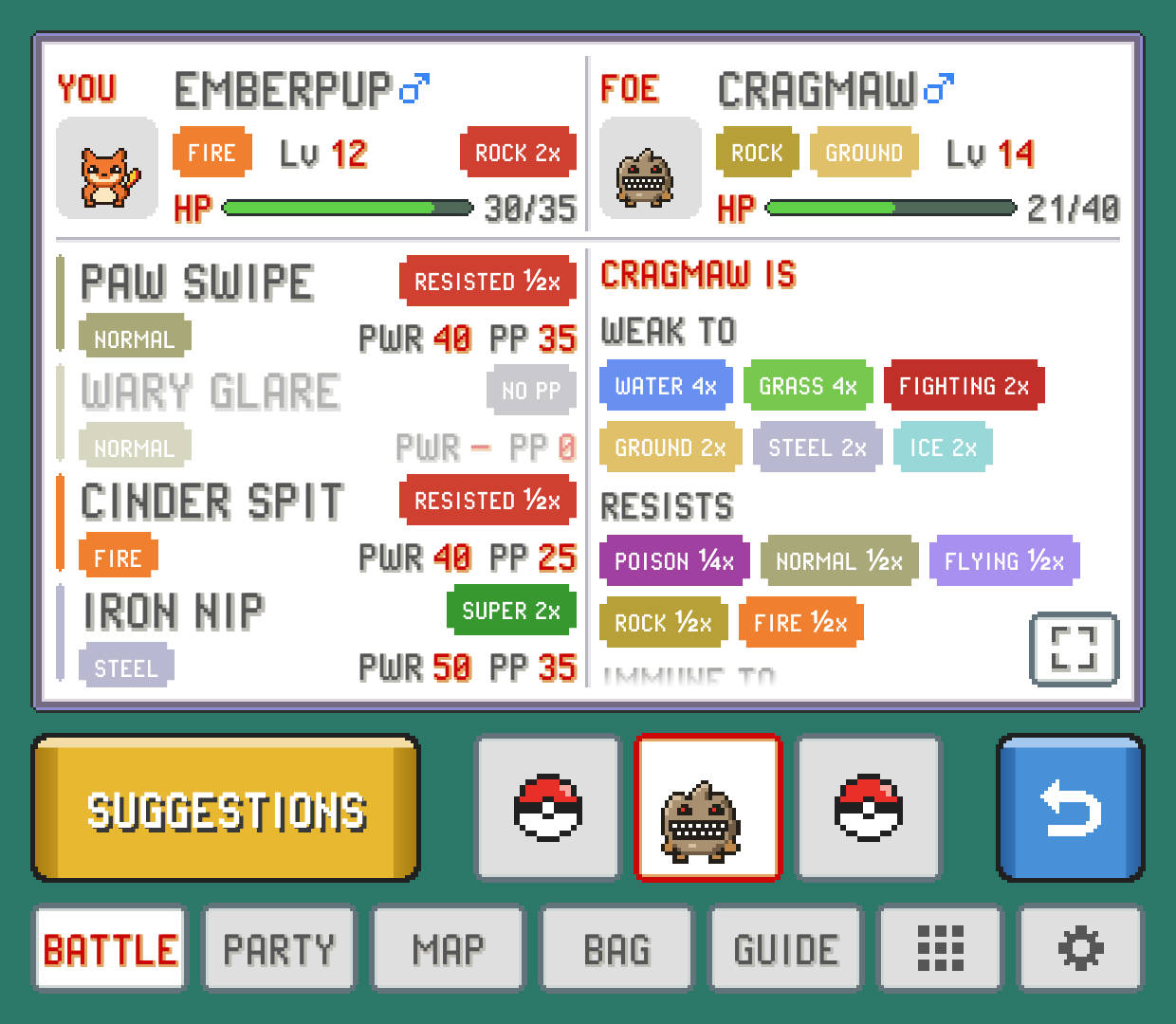
In a single battle all of that fits without scrolling. In a double battle the page scrolls.
Foe details
Scroll down the foe's column for more:
ABILITYandHELD ITEM.Its stats as they stand in this battle. Any stat that's been raised or lowered gets a small pill (+2 in green, -1 in red), and accuracy and evasion show up once they've changed.
Its moves, each with a verdict on what it does to your Pokémon. A
SUPERhere is a warning.
To give the foe the whole page, tap the button with the corner arrows at the bottom right. Your side shrinks to a strip with your Pokémon's sprite and an upright HP bar, and the foe's facts and moves get the room. Tap it again to go back. PokeDaisy remembers your choice for the next battle.
Foe IVs
The foe's IVs, EVs and nature are hidden by default, since knowing them is a bit of a peek. Turn on FOE IVS in SETTINGS and INFO gets a STATS button: your Pokémon and the foe side by side, each stat with its IV and EV, plus NATURE and HIDDEN POWER. It's the same view as the STATS page in a summary.
The foe's team
In a trainer battle, the bar along the bottom of INFO and SUGGESTIONS shows the trainer's whole team in order. Pokémon you've already seen show their icon (faded once fainted). The ones the trainer hasn't sent out yet are balls.
Tap any slot to look at that Pokémon instead of the one in battle: INFO and SUGGESTIONS switch to it, with a red frame around its slot and a pill by its name:
NEXT: the one the trainer is about to send in. The pages switch to it by themselves when the trainer announces it.FAINTED: already beaten.RESERVE: seen earlier in this battle, now waiting.UNSEEN: not sent out yet. Tapping a ball shows you what's inside, so leave them alone if you like surprises.
Tap the framed slot again to go back to following the battle.
SUGGESTIONS: who and what to use
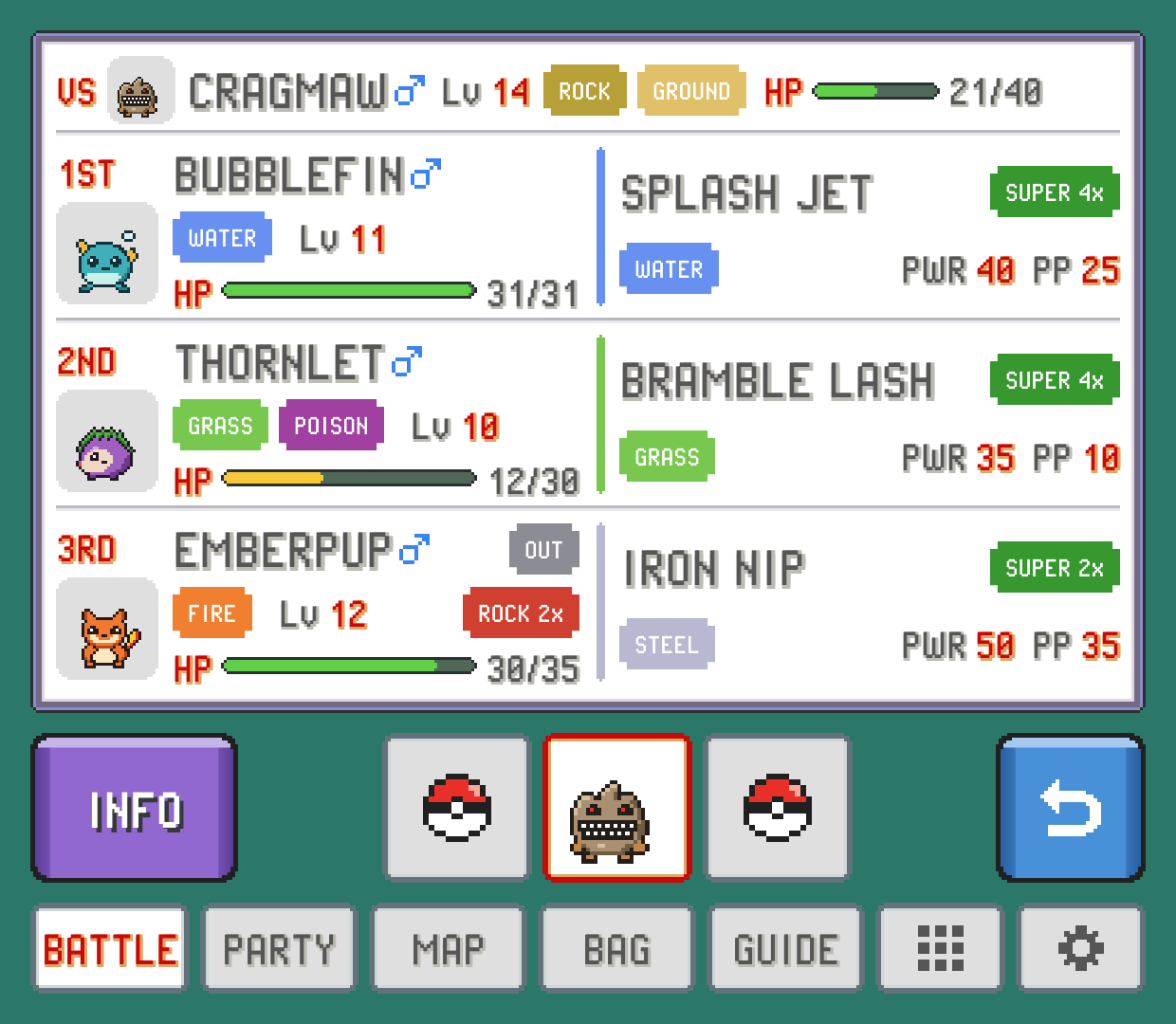
Tap SUGGESTIONS for a ranking of your whole party against the foe. At the top is a VS line with the foe's level, types and HP. Below are the three best picks, marked 1ST, 2ND and 3RD. Each shows the Pokémon's card (with OUT on the one already in battle) next to its best move and that move's verdict.
The ranking looks at how hard each Pokémon's best usable move hits this foe, and how badly the foe's types could hit back. Tap another of the trainer's Pokémon in the bottom bar and the list re-ranks against that one, which is handy for planning your next switch.
Switching during a battle
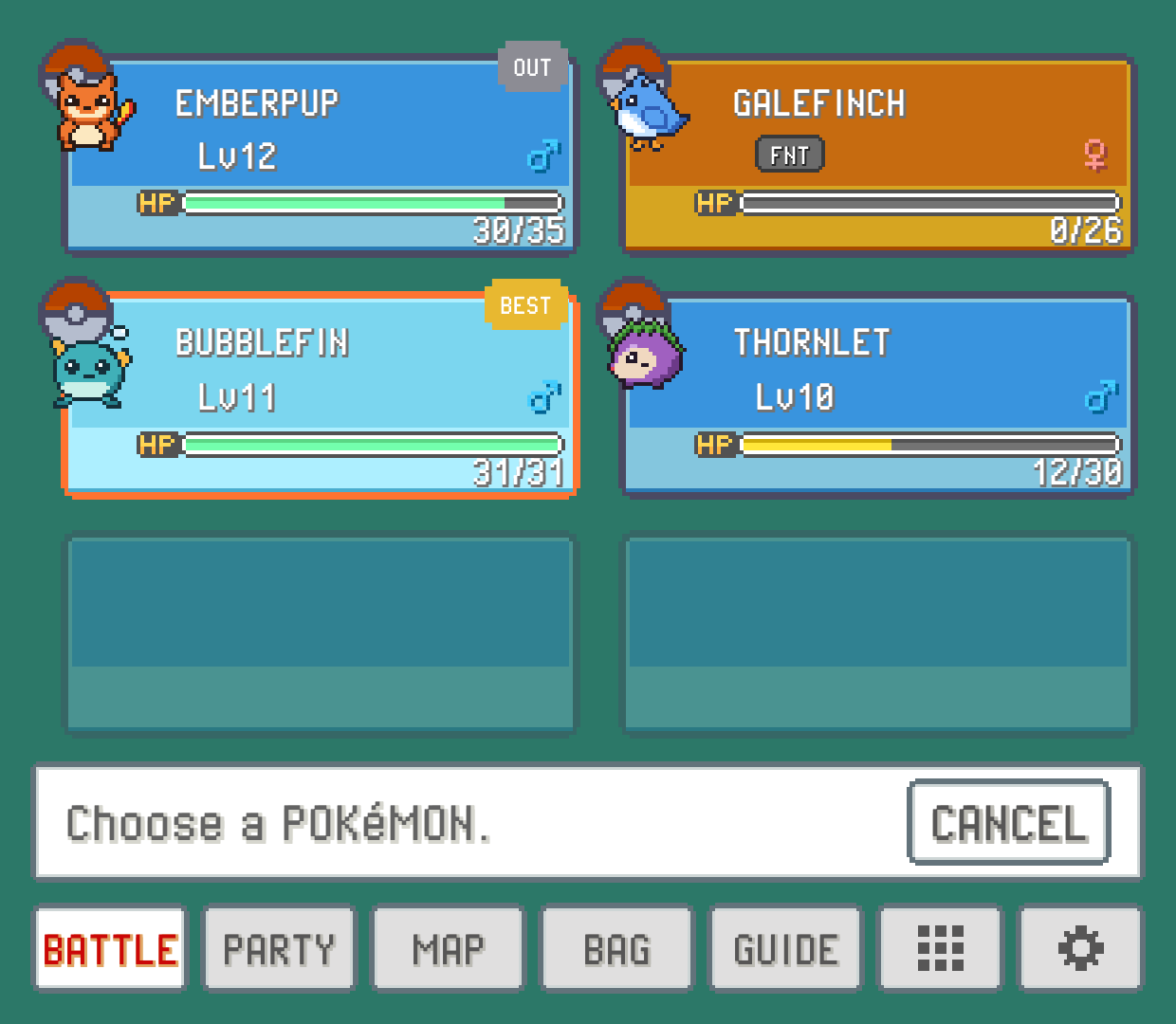
POKéMON opens your party with the game's own party slots, filling the tab, and "Choose a POKéMON." with a CANCEL button below. The cursor starts on SUGGESTIONS' top pick, tagged BEST; the Pokémon already in battle is tagged OUT.
Tap a Pokémon to send it in. PokeDaisy works the game's party menu for you, and the top screen holds still while it does, so you don't watch the menus flash by. A fainted Pokémon, an egg or the one already out can't be picked.
The same pane appears when the game asks you to choose, for example after one of your Pokémon faints.
This works in the Game Boy games too (Red, Blue, Yellow, Gold, Silver, Crystal, Crystal Clear, Prism and Polished Crystal). There the game asks what to do with the Pokémon you picked, and PokeDaisy answers its switch option for you.
On one screen: BATTLE BUTTONS
On a device with one screen, held sideways, three buttons sit at the top right of the screen during a battle: FIGHT, POKéMON and RUN. They use the room beside the game (with ASPECT on EXPAND, the background past the battle's edges; on ORIGINAL, the black bar), and on a screen where that's narrow they reach a little into the battle's top-right corner, where there's only background.
FIGHT(with your Pokémon's icon on it) opens your moves as a list down the right side of the screen, one row each in the colours of the BATTLE tab's cards: the move's name andPPleft, its type and power, and withBATTLE HINTSon its verdict against the foe (likeSUPER 2x). Tap one to use it; a move out of PP can't be picked.POKéMONopens your party as a list down the right side, drawn like the game's own party list: each Pokémon's icon over its ball (animated like the game's), name, level or status, and HP bar.BESTmarks the one SUGGESTIONS would pick (it's highlighted, like the game's cursor) andOUTthe one battling. Tap one to send it in.RUNruns away. It's greyed out in a trainer battle, where you can't.
To close a list without picking, tap outside it or CANCEL under it. The buttons look like the BATTLE tab's and dim while the battle plays out. They slide in from the right edge as a battle starts, and slide away while a list is open or the game's own party or bag screen is up. They show in single battles of the games with touch buttons, and only when there's room beside the game: not with ASPECT on STRETCH, nor while the companion is locked open beside the game. To hide them, turn off BATTLE BUTTONS in SETTINGS (SCREEN group, on either screen).
Turning the hints off
If you'd rather work out matchups yourself, turn off BATTLE HINTS in SETTINGS. The verdicts on moves, the foe's weaknesses, the warnings on your card and the BEST tag all go away. The facts stay: HP, types, levels, moves, power and PP. (SUGGESTIONS is still there if you ask for it.)
Something wrong or missing here? Edit this page on GitHub or tell us.